

At our recent DataOps Day Boston event, my colleague Jeffrey Schroeder made an observation that stuck with me. With on-premises software, people are often motivated to upgrade for a single feature and look past learning about all the other capabilities that shipped with it.
HighByte Intelligence Hub version 4.5 has its share of headline features, including the Modeling Agent, Data Lineage Graph, and expanded i3X support. However, what might be just as compelling is the B-side of the release. For those familiar with vinyl music records, the B-side was the secondary track on the reverse side of a record. It was rarely promoted, but it tended to become a listener favorite.
These features are technical by nature and unlikely to lead a press release. They are also the ones that remove workarounds, reduce resource demands, and make large deployments easier to run. Here are several worth knowing for version 4.5.
A Faster Path from Historian/File to Cloud Storage
If the number of customers using AVEVA PI System is large, the volume of data they are processing from it is massive. One of HighByte’s customers in the Energy industry, moves roughly 6 billion records a day from PI to Snowflake using multiple Intelligence Hub instances while pulling from other historians in parallel. At this scale, efficiency matters at every step.
Most reads coming from PI System are for Point and Point Changes, where the Intelligence Hub has typically represented those values as JSON. While this makes sense for other data inputs, doing so for large PI data sets turns these values into excessively long arrays, which strains pipeline performance.
In version 4.5, these values are now processed in the Intelligence Hub PI Agent in Parquet format, a compressed, type-safe columnar format, and transmitted to the Intelligence Hub runtime where they can be written to disk instead of holding values in memory. The PI Agent also now supports the PI SDK point cache to improve read and write speeds, which we expect to be significantly faster for customers.
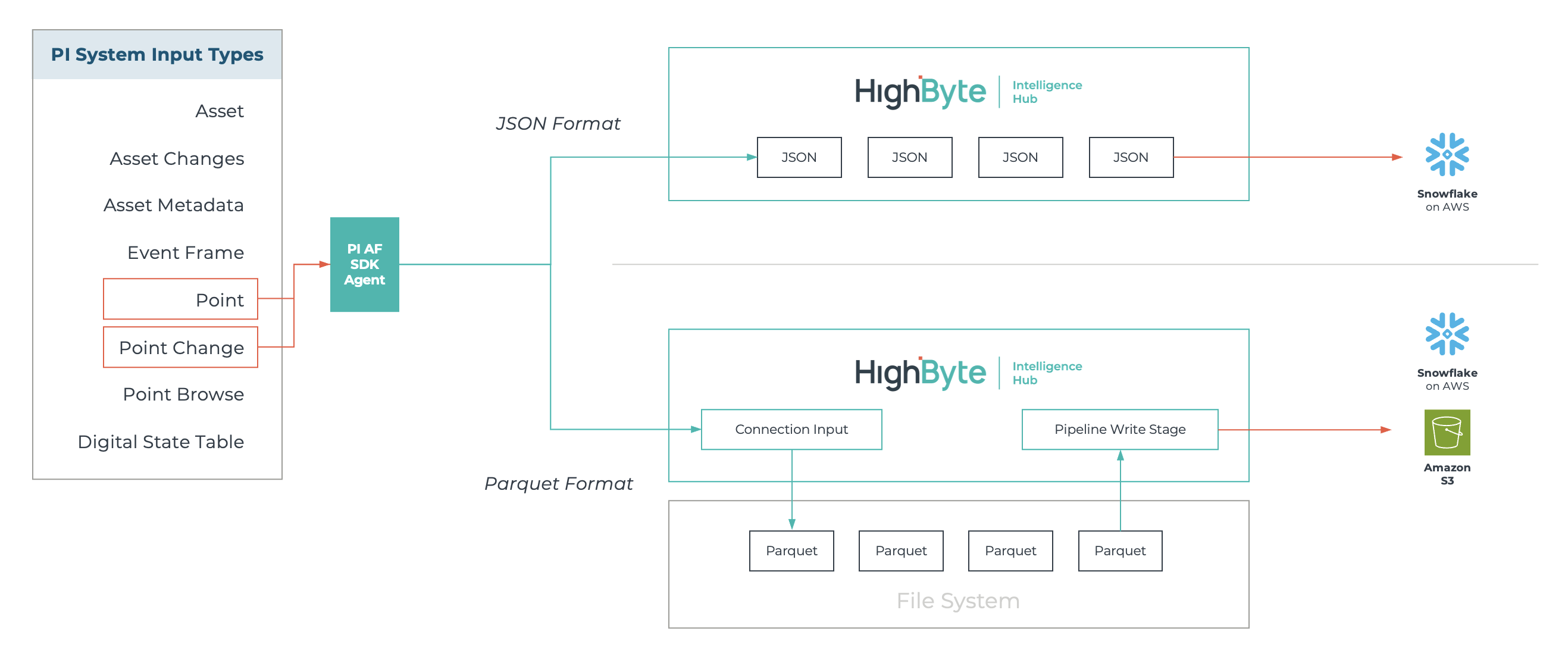
Figure 1: New Parquet serialization on PI inputs and direct file-to-cloud outputs enhance processing speed and efficiency.
As part of this work, we also changed how the Intelligence Hub handles files. In previous versions, files larger than 128 MB could not be handled by the Intelligence Hub because each file was read into memory before it was written to the target. A backlog of ten files meant ten times 128 MB in memory for a single pipeline, which could quickly overload a system.
The new "file path” source option on file-based outputs, including File, Amazon S3, Azure Blob Storage, Azure Data Lake Storage Gen2, and Databricks Storage, streams files directly from disk to the target without loading them into memory. For PI, pairing Parquet with this direct transfer is what makes high-volume movement efficient. It also opens the door to much larger files, such as image files, 3D point cloud imaging, CAD files, and verbose test logs to be handled by the Intelligence Hub.
Cleaning Up Telemetry Without Modeling Everything
Telemetry from a DCS or OPC server rarely arrives clean. Tag identifiers vary from one machine or area to the next, and the same machine state might be recorded as “Running,” “Run,” or “On.” Often the mapping to fix this already exists in database tables or Excel spreadsheets. We saw customers mapping massive OPC tag reads to models and instances when all they wanted was to rename tags from one name to another or use complex scripts to translate values. We also saw customers re-reading the same reference metadata every second, minute, or hour so a pipeline could iterate through it. The approaches available in the product worked, but with performance limitations and maintenance headaches.
Lookup Maps in HighByte Intelligence Hub version 4.5 give these cases a single, dedicated home. A Lookup Map is a named, in-memory key-value store that you define once and reference from instances or pipelines, essentially a find-and-replace routine that runs in memory. Static Lookup Maps are defined in project configuration. Dynamic Lookup Maps are populated by a backing pipeline, from a source such as a database, and refresh on a configurable interval. Lookup Maps didn’t make the list of headline themes for version 4.5, but for certain customers they are a major improvement in both performance and usability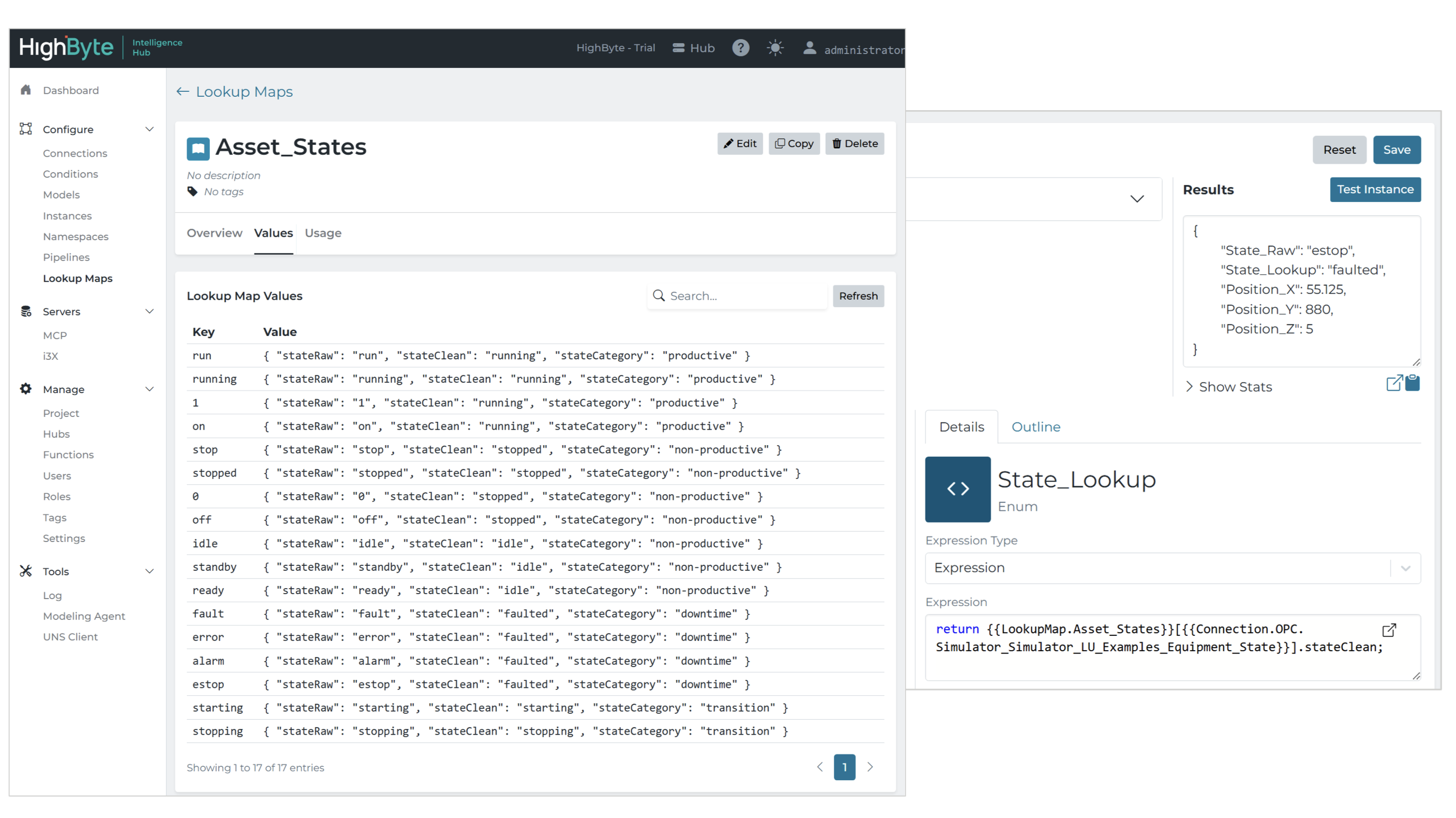
Figure 2: Lookup Maps offer an improved experience to managing OT-based naming conventions in the Intelligence Hub.
Managing Message Flow Under Load
Message-based architectures work well until the inbound messages spike. When an Edge device reconnects and flushes its store & forward buffer, a consumer can receive more messages than it can process, and messages risk being dropped. New in the Intelligence Hub version 4.5:
-
MQTT connections can limit how quickly QoS 1 and QoS 2 messages are acknowledged, applying back pressure so messages are not dropped during high-throughput events.
-
For Sparkplug networks, the Intelligence Hub can serve as a Primary Host application, which allows Edge Nodes to begin store & forward if the hub disconnects from the broker.
- A NATS connection enables reading and writing messages on NATS subjects in the Intelligence Hub, with optional JetStream support for persistent streaming.
Collectively, these improvements to message handling and connectivity provide added confidence to customers with the highest data quality and governance demands.
Fitting Into the IT Toolchain
Enterprise deployments increasingly involve a separate infrastructure team. While many of these DevOps-focused teams might not know what a PLC or an OPC UA NodeSet is, they expect the Intelligence Hub to work with the identity, observability, and orchestration tools they already run. While recent releases of our product have addressed these needs, version 4.5 carries the torch with a few specific updates.
OpenID Connect (OIDC) was added in version 4.5 as an identity provider option alongside Active Directory and SAML 2.0, offering a direct path to providers such as Okta and Microsoft Entra ID.
OpenTelemetry metrics include host metadata to identify individual hubs in a cluster, with pull-based collection now possible alongside push.
New readiness endpoints make it easier to manage High Availability deployments and identify which node is primary. High Availability (HA) now has configurable check-in timing and includes start scripts that simplify running HA with Docker.
Git export supports partial projects, while Git deployments can import model definitions in JSON Schema and OPC UA NodeSet formats.
A HighByte-maintained ARM64 Docker image is available in the account portal.
Small-But-Mighty Lightning Round
Some of the most welcome changes are the smallest, especially when they eliminate a workaround or reduce the need for custom code. Here’s a recap of the small-but-mighty changes that pack a punch in version 4.5:
- Inputs can parameterize boolean, select, and array fields, which is useful for OPC UA Nodelds and other complex configurations.
- JSON Schemas for Pipelines, Connections, Models, and other configuration components are downloadable from the UI and exposed through MCP tools, giving configuration agents the context to generate accurate configuration on a user's behalf.
- Read stages include a path setting that selects which part of a read result moves forward, so a SQL lookup can return a single row as an object rather than an array of one.
- Write stages can likewise select the exact value written to the target. Both reduce the need for intermediate JavaScript transform stages.
- The redesigned reference panel groups Connections, Instances, and Lookup Maps, and it is searchable, so you can jump straight to an input by name.
- Trigger stages can be added inline.
- Stages dragged in from the menu open their configuration immediately. Watch this short video for a walkthrough of these pipeline improvements.
Wrap Up
Headline features show where Industrial DataOps is headed. But the B-side determines how well a deployment holds up at scale. These features lower memory demands, clean up inconsistent telemetry, protect data during throughput spikes, and make the Intelligence Hub easier for IT teams to deploy and operate. If you upgraded to version 4.5 for a single feature, the rest of the release deserves a closer look.
To learn more, please check out these additional resources:
- Read the product announcement
- Explore the release notes for details on all new features and fixes
- Watch demos of new features in version 4.5
- Request a free trial or log in to your existing account to get started